Dijifis partner
Contactless ordering system
Build a commission-free digital ordering channel on Dijifis with contactless ordering. QR menu scan and more in one panel — reach customers under your own brand.
What is a contactless ordering system?
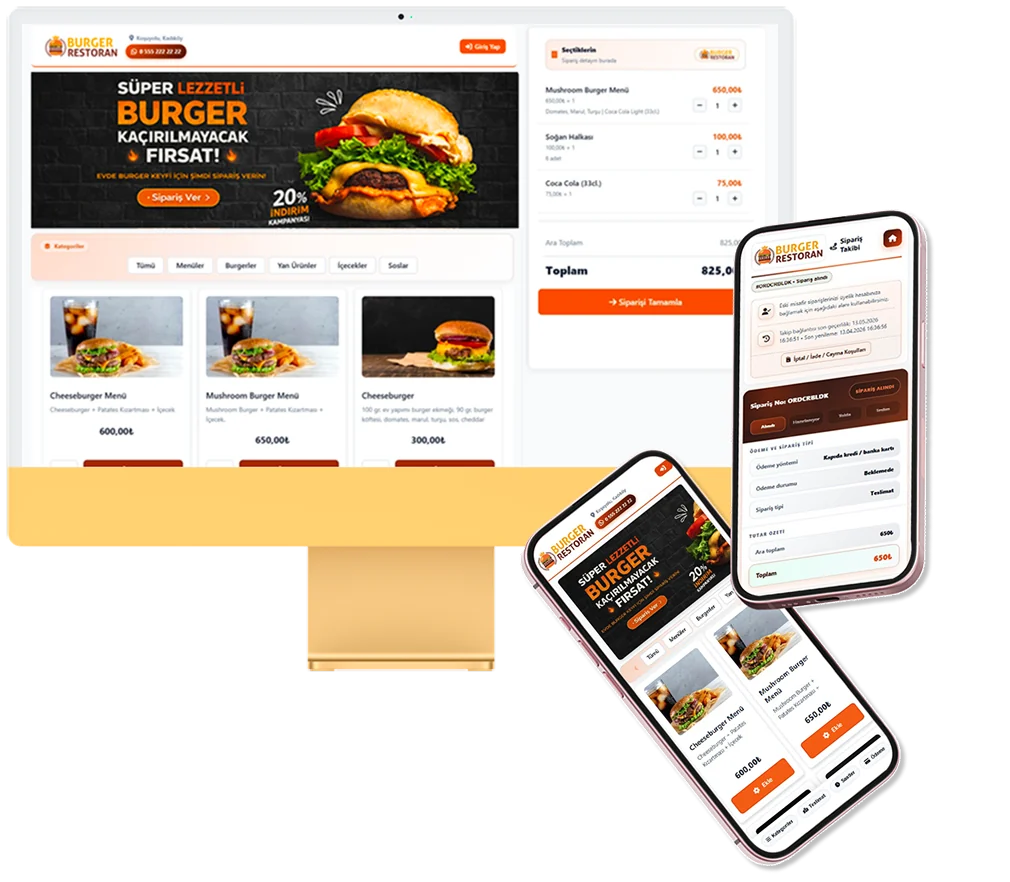
A system that minimises physical contact through QR codes and digital menus. Dijifis collects orders from restaurants, cafés and retailers via web and mobile browsers; the management panel controls everything centrally.
In the commission-free model you sell under your own brand without a percentage cut on turnover. Menu updates, campaigns and delivery rules apply instantly; phone traffic drops while order records grow steadily.
Guests expect clear order confirmation and estimated prep time — the panel shows this transparently.
Industry-specific menu structures — portions, weights, variants or daily lists — are modelled flexibly in the Dijifis panel.
A contactless-focused digital channel consolidates traffic from social media and Google search into one order point.
- QR menu scan
- Contactless payment
- Hygiene-focused service flow
In short, contactless ordering forms the digital storefront and operational backbone of your business — single-centre management instead of paper menus and scattered channels.
How does a contactless ordering system work?
When live, the customer scans a QR code or opens your order page, selects products and payment. The order lands in your panel; kitchen or prep staff get an instant alert.
- Define menu, prices and delivery settings in the Dijifis panel.
- Publish QR codes on tables and share your order link.
- Confirm orders; update preparation time.
- Close when delivery or pickup is complete; review reports.
Online payment integration supports contactless checkout; cash or card on delivery can be configured. Multi-branch setups route orders correctly.
After go-live, validate with test orders and sync kitchen and cashier screens.
Saved addresses and favourites speed repeat visits and improve conversion.
Define coupons or automatic discounts from the panel.
Advantages of contactless ordering
Businesses using contactless ordering gain efficiency and cost control. The digital channel improves guest experience while balancing staff load.
- QR menu scan
- Contactless payment
- Hygiene-focused service flow
- Commission-free direct sales channel
- Mobile-friendly interface; no app download for guests
Marketplace dependency decreases; customer data and brand stay under your control.
Digital order details reduce phone errors and wrong kitchen notes.
Commission-free direct sales often save significantly vs marketplace fees on an annual basis.
Menu changes go live immediately without app-store approval.
Who is contactless ordering for?
From single-site operators to growing brands — especially venues that want minimal physical menu handling.
- Restaurants and cafés
- Takeaway-oriented kitchens
- Retail and boutique outlets
- Small businesses expanding online
Small teams adapt quickly; setup guides and support speed onboarding.
The system especially suits businesses that need QR menu scan and hygiene-oriented guest flows.
Growing brands add locations from the same panel with the multi-branch module.
Operational transformation with contactless ordering
A digital order channel aligns kitchen, cashier and service — not just a website. Steering guests to QR in the first weeks accelerates adoption.
Short staff training: confirm orders, update prep time, handle cancellations on the panel. Simple checkout keeps abandonment low.
- Define accept and reject rules
- Test kitchen printer or display
- Clarify dine-in, delivery and pickup hours
- Compare first-month reports with marketplace performance
Practical tips
Start with core menu items; expand from the panel. Prioritise photo quality on bestsellers.
Place QR cards on every table; add your order link to social bios and receipts. Google Business Profile order URL brings organic traffic.
- Keep menu photos current
- Show minimum basket and delivery fee clearly
- Update prep time at peak hours
- Plan loyalty campaigns
- Review slow sellers monthly
At scale, panel data supports menu engineering. Dijifis support helps after setup — track ROI via order volume, basket size and reorder rate.
Related topics and resources
Evaluate contactless ordering with pricing, commission comparison and setup guides.
- pickup ordering system
- registration and setup guide
- online ordering pricing
- waiterless ordering system
- marketplace alternative guide
For details and a demo contact us or review free setup steps.
Frequently asked questions
How long does it take to set up a contactless ordering system?
If your menu is ready, you can go live within a few days. Follow the steps on the registration and setup page.
Is the contactless ordering system commission-free?
Dijifis does not take a turnover commission on your own channel. See the evaluation guide for details.
Do customers need a mobile app for contactless ordering?
No — customers order from a mobile browser. See ordering without downloading an app.
Get started
Contact us about an online ordering solution for your business and start taking orders on your own channel with Dijifis.